Showing posts with label scalability. Show all posts

Wednesday, October 14, 2015

Multi-Site Management in OpenStack

Managing multiple Openstack clouds as a single resource pool


In this series of posts, we would be diving into "Tricircle" 
- an open source project that promises to give a "single pane of glass" management over multiple OpenStack environments, using a cascading approach.

As more and more companies are deploying OpenStack, it is becoming clear that there is a need to be able to manage multiple cloud installations. The reasons range from application lifecycle management, through spill-over scenarios and all the way to multi-site Disaster Recovery orchestration.


So why would one care to deploy the same service over multiple environments?


There are multiple reasons, and here are a few:

  • Service continuity and geo-redundancy (in case of one site going awry)
  • Geo-based load balancing and service locality (in case traffic comes from various places in the globe, or if there are strict quality/latency requirements, or if there are regulatory constraints, etc)
  • Cost optimization (in case some resources are cheaper in another place)
  • Growth (in case one environment cannot grow enough)
  • Resource Utilization (in case you have multiple sites and want to aggregate their resources for better value or easier management)
  • Single Configuration (instead of continually synchronizing multiple sub-instances of the service)
  • ... (feel free to share additional incentives in the comments).

OpenStack Tricircle


Managing multiple OpenStack instances could be done in several ways, for example by introducing multi-site awareness into each project in OpenStack (which we ruled out due to complexity of evolving all OpenStack projects to do it).

The approach we took in Tricircle was to add a "Top" management OpenStack instance over multiple "Bottom" OpenStack instances.

The "Top" introduces a cascading service layer to delegate APIs downwards, and injects itself into several OpenStack components.


So, how does it feel to use such a "Top" OpenStack instance?


Well, first of all let's define the different users:
  1. The Multi-site Tenant Admin (the "User") - Uses the multi-site OpenStack cloud (create VMs, networks, etc.)
  2. The Multi-site Admin (the "Admin") - This user can add new sites, and needs to have the necessary credentials on them to put it together
User


For the "User", it is pretty straightforward: when you launch a VM, you get to choose from a list of Data Centers (a new drop box in Horizon), and then from a list of Availability Zones based on your Data Center selection, and that's basically it.

Admin


For the "Admin", you get a new "Add Site" API (in CLI only, at this point), and you need to have substantial knowledge about the "Bottom" sites you are adding (credentials and network-related information which we will cover in the next post).

Some High-Level Architecture


The "Top" Instance


The design principle we took was to reuse OpenStack components in the TOP and bottom layer as much as possible and to mange any OpenStack
deployment without any additional requirements (OpenStack API compatible).

For the top layer we used a non-modified OpenStack API layer to intercept operational requests and handle them in the cascading service.

Doing this required integrating with the different OpenStack core components:

Neutron 


  • We introduced a custom core plugin
  • Updates are written to the database 
  • Operational requests are forwarded to our OpenStack Adaptor service
  • Reads and Reports are served directly from the database

Nova


  • We implemented a custom Nova Scheduler that runs inside our OpenStack Adaptor service
  • We created a Compute Node emulation that runs in the Adaptor service and listens to the Nova Compute service queues
  • Our current working assumption is to map "Bottom" sites as "Compute Nodes" that reside on different logical AZs
  • The Compute Node emulation instance for each "Bottom" site also aggregates information and statistics that represent the site
  • At some point, we plan to let the admin decide how to expose the "Bottom" sites, e.g. different AZs on the "Bottom" site, or all the actual "Compute Nodes", etc. This will create a complete decoupling between the Adaptor and the "Cascading" service.

The "Bottom" Instances


We assume that the "Bottom" sites are unmodified and potentially heterogeneous (in terms of network, configuration and version).

At this stage, our design assumes a centralized Keystone service running on the "Top" (we are planing "Federated Keystone" in the future).

In order to add a "Bottom" site to the multi-site environment, the admin needs to deploy a "Cascaded" service, and register it in the "Top" site, using a special "add site" API.  Then, configure the "Bottom" site to use the "Top" Keystone.


The Full Picture


Here is how the entire system looks:


Is it really that simple?


From the user experience point of view - We hope it is.  
But in order to get it there, we needed to handle quite a few obstacles:
  • Resource Synchronization across the Multi-site
  • Cross-site network
  • Image synchronization
  • Metadata synchronization (e.g. flavors)
  • Resource Status monitoring and propagation (i.e. so that you can see what's happening from the "Top" dashboard) 

Coming next


In our coming posts, we will dive into resource synchronization, the cross-site networking, explain how we tackled the status and notification updates and share our approach to meeting large scale deployments.

Please share your thoughts about this in the comments.
We will be talking about this project in the upcoming OpenStack Tokyo summit, so if you're coming there, be sure to attend our talk.

To join the development effort: 

Tuesday, May 5, 2015

DragonFlow SDN based Distributed Virtual Router for OpenStack Neutron

In my previous posts I presented a PoC implementation of an embedded L3 controller in Neutron that solves the network node bottleneck the SDN way, and overcomes some of the DVR limitations.
In this post I am going to cover the first release of DragonFlow - an SDN based Distributed Virtual Router L3 Service Plugin (aligned with OpenStack Kilo), now an official sub-project of Neutron.
The main purpose of DragonFlow is to simplify the management of the virtual router while improving performance, scale and eliminating single point of failure together with the network node bottleneck.
The DrangonFlow solution is based on separation of the routing control plane from the data plane. This is accomplished by implementing the routing logic in distributed forwarding rules on the virtual switches (called "flows" in OpenFlow terminology). To put this simply, the virtual router is implemented using OpenFlow flows only.
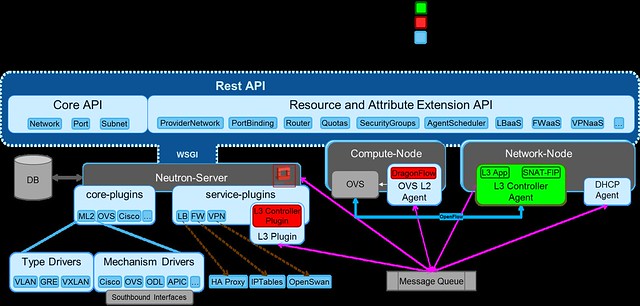
DragonFlow eliminates the use of software stack to act as a virtual router (the Linux network namespaces in the DVR and the legacy L3 architecture), it use purely OVS flow to act as a virtual router. A diagram showing DragonFlow components and overall architecture can be seen here:
DragonFlow High-level Architecture


DragonFlow Features for the Kilo Release:

  • East-West traffic is fully distributed using direct flows, reactively installed upon VM-to-VM first connection.
  • Support for all ML2 type drivers GRE/VXLAN/VLAN
  • Support for centralized shared public network (SNAT) based on the legacy L3 implementation
  • Support for centralized floating IP (DNAT) based on the legacy L3 implementation
  • Support for HA, in case the connection to the Controller is lost, fall back to the legacy L3 implementation until recovery. Reused all the legacy L3 HA. (Controller HA will be supported in the next release).


Key Advantages:

  • Performance improvements for inter-subnet network communication by removing the number of kernel layers (namespaces and their TCP stack overhead)
  • Scalability improvements for inter-subnet network communication by offloading L3 East-West routing from the Network Node to all Compute Nodes
  • Reliability improvements for inter-subnet network communication
  • Simplified virtual routing management, mange only active flows and not all possible 
  • Non Intrusive solution, does not rely on ML2 modification

How it works

  1. On bootstrap the L3 service plugin sends an RPC message to the L2 service plugin, setting the L3  Controller Agent as the controller of the integration bridge.
  2. The Controller queries the OVS  for its port configuration via Openflow, matches the actual ports configured on the OVS to the Neutron tenant networks data model. 
  3. Then, it installs the bootstrap flow pipeline that offloads all L2 traffic and local subnet L3 traffic into the NORMAL pipeline, while sending every unmatched VM-to-VM inter-sunbet traffic to the controller.
DragonFlow L3 Service Bootstrap

The following diagram shows the multi-table OpenFlow pipeline installed onto the OVS integration bridge (br-int) in order to represent the virtual router using flows:

bootstrap flows pipeline

The base table pipe-line is installed proactively on bootstrap while the East-West rules on the L3 Forwarding table are installed reactively on each first VM-to-VM communication.

If you would like to try it yourself, install guide is available here.
To join the development effort: 
My next post will cover the L3 reactive OpenFlow application, and how we install the East-West reactive flows. 

Thursday, January 15, 2015

Common Misconceptions about SDN Controller Management and Scalabilty

Here are a few common misconceptions about SDN controller management and scalability.

#1: Either Proactive mode or Reactive mode

When an SDN controller wants to enforce a set of rules or a policy on a forwarding element, it uses the southbound API, OVSDB, OpFlex, OpenFlow or others. In OpenFlow this process is called flow installation and it can be done using different methods: proactive, reactive or mixed (aka hybrid approach).  


Proactive

During bootstrap, the controller installs all flows and pipelines (multi-table entries) into all the forwarding elements.  The flows must cover all possible scenarios.
Whenever there is a change in the network, the controller removes or installs flows where necessary.


Reactive

When a packet arrives in a switch, a look-up is performed on the flow tables.
If there is no match and the switch is connected to a controller, it will forward the packet (either with or without its payload) to the controller.
In OpenFlow, this is called a PACKET_IN message.

It is also possible to create rules that forward the packet to the controller when matched and we call that...


Mixed Proactive / Reactive

With the mixed approach, you can benefit from the best of both worlds, achieving a balance between dynamic management and performance.

For frequently-used and rarely-modified flows, you install a pipeline and flows proactively.

For unmatched flows, or for flows that you want to handle in-line in your SDN application, you install a flow to forward the packet to the controller.

This mixed approach allows the controller to focus on making real-time dynamic decisions only on the traffic that requires it (reactive), while leaving the heavy-lifting of the majority of the traffic to the real-time forwarding element (proactive).

In addition, with this approach you can avoid over-provisioning the forwarding element with flows that are rare, thus dramatically reducing the number of entries in the flow tables. 

#2: Lack of Scalability and High Availability


In SDN, the control plane (i.e. the SDN Controller) is separated from the data plane (i.e. the Forwarding Elements).

Due to the centralized nature of control in SDN, we now need to support high availability and redundancy of the Control Plane.

In OpenFlow, the Forwarding Element (the Switch) connects to the controller via TCP or via TLS for secure channels.

Up until OpenFlow v1.2, whenever the connection to the controller was lost, the switch would lose the ability to forward PACKET_IN messages to the controller, thus having to drop all unmatched traffic or handle it in the NORMAL switch (only in switches that implemented the dual nature). 

This non-deterministic approach would yield unpredictable network behavior 
while the controller was unavailable.

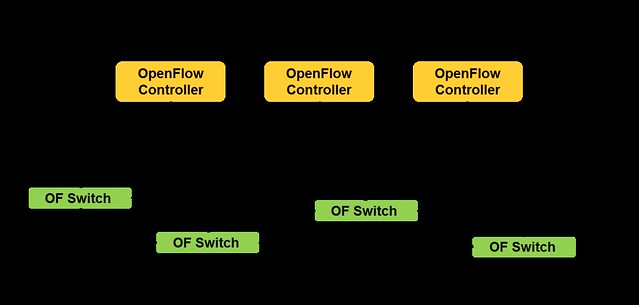
OpenFlow v1.2 introduced the capability of working with multiple controllers.
The Master and Slave modes provide a mechanism for Active-Passive high availability, whereas the Equal mode provides an Active-Active model.

OpenFlow multiple controllers


With the multi-controller capability, we gained the control plane high availability we needed, improved reliability, fast recovery from failure and controller load balancing.

#3: You cannot design SDN Applications for Really Big Scale


Utilizing the two mechanisms I covered - Mixed-Mode and Multi-Controller - is the key to designing really big scale SDN applications.

If you take care to design your application to be stateless (whenever possible) and share nothing (or little) with other controller instances you can benefit from the Reactive mode where any instance can handle any flow.

In my opinion, the best approach for achieving minimal controller response latency and maximal bandwidth while keeping the dynamic allocation of flows, is by using all of these mechanisms together.

When you add to that the OVS OpenFlow extensions and the dual-nature Hybrid OpenFlow capability (which I covered in my previous post), you can really gain a dramatic performance and management boost.


In my next post I will demonstrate how we utilized these design guidelines and capabilities in a prototype for an alternative to Neutron's L3 Distributed Virtual Router.